English
Français
Deutsch
Norsk
|
EN
|
FR
|
DE
|
NO
|
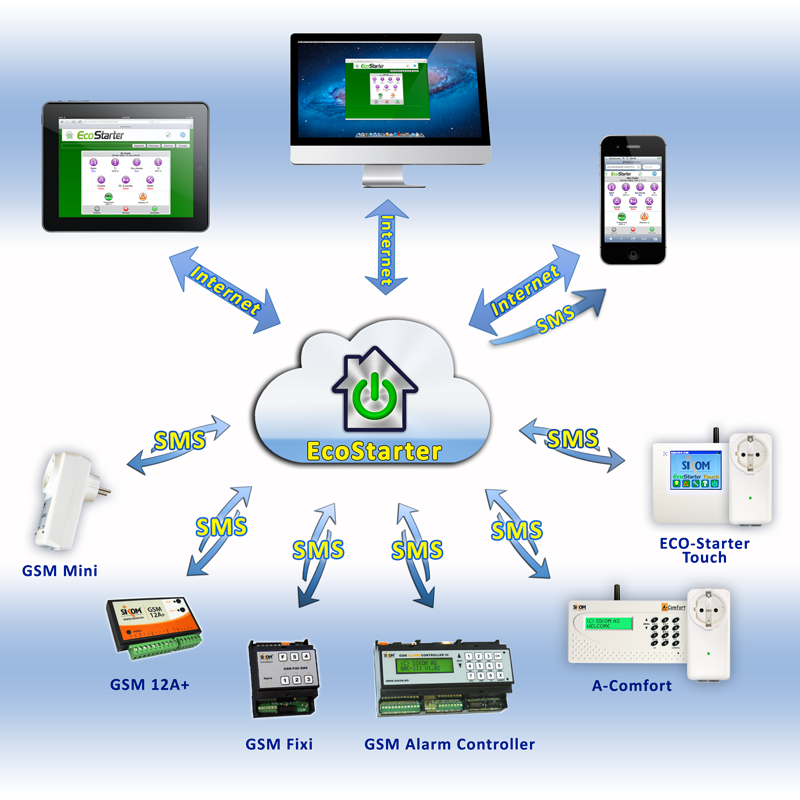
Combine the benefits of the Web and the GSM mobile network !
EcoStarter optimizes the potential of your SMS-operated switch
Overview
Advantages
Screenshots
Prices
Graphical user interface optimized for smartphones,
tablets and desktop computers (PC, Mac, Linux).
Communications are cheaper and more reliable
than with manual texting!
Automated services: periodic check-ups, tracking of temperatures and voltages.
More dependable alarms: retransmission by SMS and by e-mail,
management of acknowledgements and archives.
Website usage conditions
Privacy and security
General terms of use of EcoStarter WebApp
Swiss made software
Copyright © 2008-2024, EcoStarter GmbH
Contact


 Swiss made software